How to redact a screenshot on iPhone
A support screenshot can include your email, delivery address, or a message from someone else. Use Cloakshot to cover those details and keep the part you need help with readable.
Open the screenshot
Install Cloakshot from the App Store. Open the app, tap Choose images, and pick the screenshot. Open the imported image from Local album to scan and review it.
You can also start in Photos: open one image, tap Share, and choose Cloakshot. In the extension, tap Edit in Cloakshot to use the full scan and mask editor. The extension accepts one PNG, JPEG, or HEIC image at a time.
If Cloakshot is missing from the Share menu, start inside the app with Choose images.
Check the suggestions
On Review, look through Suggested edits. Turn on the details you want to hide. Turn off a suggestion if it covers text the recipient needs.
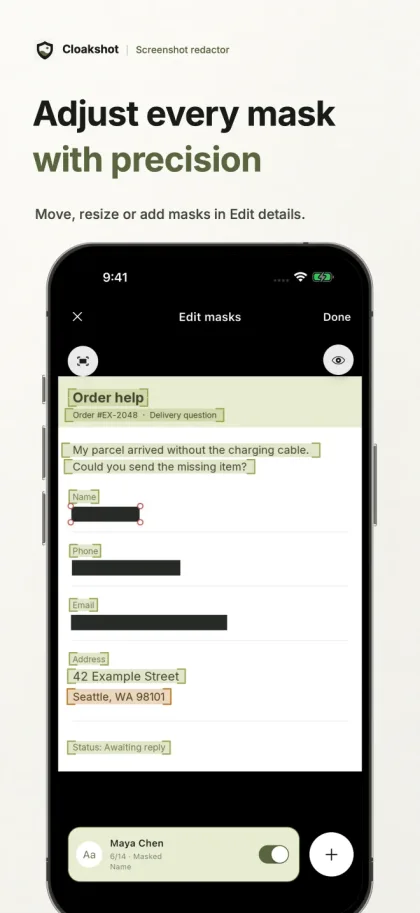
For an order-help screenshot, you might keep the missing-item message and cover the name, phone number, email, and delivery address. Decide whether the recipient actually needs the order number.
Check the full image too. A notification at the top or a name in the conversation header can be easy to overlook, and the scan can miss things.
Adjust the masks
Tap Edit details. Pinch to zoom in, then move or resize a mask so it covers the whole detail. Leave a little space around the text rather than cutting through the first or last character.
Use Add mask for anything the scan missed. If only part of a name needs hiding, use the text-selection controls to select a word or individual characters. Tap Done when the masks look right.
For passwords or API keys, choose Solid black in Settings → Detection before opening the image for review. An opaque fill makes the covered area easy to check.
Export and check the copy
Review any GPS or photo-metadata removal options shown on the Review screen. Then tap Export. The main app writes the selected masks into a new PNG, checks the selected edits, and scans the copy again before opening the system Share menu.
Save the copy or send it to the app you intended to use. If you save it first, open that file and zoom in on each covered detail. Check that you are sharing the new copy, not the original from Photos.
The automatic checks can still miss private information. Read the surrounding text and look at the edges of every mask yourself.
What is free?
Scanning, reviewing, and editing masks are free. Saving or sharing the redacted copy needs an active trial or Cloakshot Pro Lifetime.
Check the Cloakshot Pro screen for an eligible 14-day trial. Starting it needs an online device check, but no account or payment details. It does not renew automatically. Pro Lifetime is a separate one-time purchase.
Cloakshot scans and edits images on your device. It does not upload your images or scan results. See the Privacy Policy for purchase, trial, and other network activity.