
What to redact before sharing a screenshot with AI
You want help writing a message about a missing item. The screenshot includes the useful conversation, but also your name, phone number, email and address. Cover the unrelated details before attaching the image to an AI chat.
On this page
Start with the question you want answered
In this fictional order conversation, the parcel arrived without a charging cable. The request is simple: help write a reply asking for the missing item. The AI needs the missing-item message and enough context to understand it.
It does not need a phone number or home address to suggest that wording. An order number may be useful when writing to the actual seller, but you can replace it with a placeholder in a general drafting request.
For another task, make the same decision based on what you are asking. An account error may need an error code. A payment screen may contain a balance or identifier unrelated to the problem. Keep only the details needed for the question.
Read the screenshot field by field
| Visible detail | What to do |
|---|---|
| The missing charging-cable message | Keep Explains the problem |
| Conversation heading and reply status | Keep if useful Shows the context |
| Full name | Cover Not needed for the suggested wording |
| Phone number and email | Cover Not needed for the suggested wording |
| Street, city and postal code | Cover both address lines Not needed to explain a missing item |
| Order number | Cover or use a placeholder The seller can receive it later through the proper channel |
The name, phone and email are covered in the Review screen below, but the address and order number are still visible. For this AI drafting request, those need attention too.
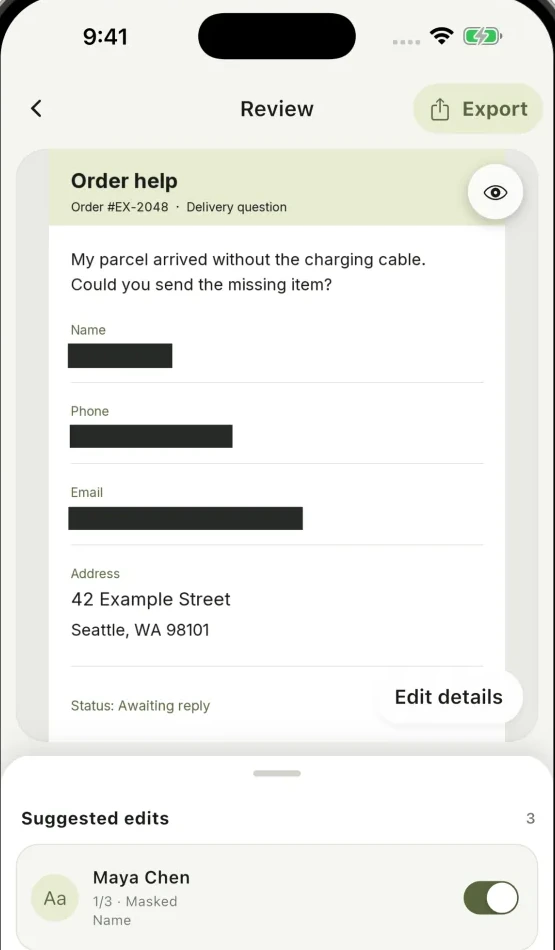
For the finished copy used in this drafting request, keep the missing-item sentence, cover both address lines, and hide the order number or replace it in the accompanying text. The recipient should still be able to understand what went wrong.
Review and edit on your phone first
In Cloakshot, tap Choose images, select the screenshot and open it from Local album. You can also share an image into the app. On iPhone, use Edit in Cloakshot from the extension for the full editor.
On Review, choose the suggestions you want. Open Edit details to move or resize a mask. Use Add mask for the uncovered street, city or any other detail the scan missed.
If a suggested name mask also covers the sentence you need, adjust its edges rather than hiding the whole conversation. Keep the question readable while covering the unrelated details.
Cloakshot scans and edits locally without an account. It does not upload your image or recognized text for redaction. When you later send the copy to an AI service, that is a separate upload to that service.
Check the edges and the rest of the image
Read the top and bottom of the screenshot. Notifications, a profile name, another person's message or a browser address bar can reveal details outside the area you were editing.
A QR code can contain information that is not obvious from looking at its pixels. A photo may also have GPS or other metadata. Review the suggestions for those categories and the metadata-removal options when they apply.
If the screenshot contains a password, key or token, cover the complete value and inspect repeated copies. The credential guide has a more detailed example for developer screenshots.
Export the copy, then attach it to the question
Tap Export in the main app. Cloakshot creates a separate PNG, checks the selected edits and scans the copy again. Open the file if you save it, and make one final pass over the whole image.
You can then ask something like: Help me write a short reply asking the seller to send the missing charging cable. Use the exported image as the attachment. Keeping the question clear can also reduce how much surrounding information you need to include.
Scanning and editing are free. Export needs an active eligible 14-day trial or Pro Lifetime, which is bought once. The trial requires an online device check, no payment details, and does not renew automatically.