How to find private details a screenshot scan can miss
Three fields are covered, so the screenshot looks finished. Then you notice the address underneath. A scan can give you a useful starting point, but the whole image still needs a read before you send it.
On this page
Start with the visible address in this example
The fictional order-help screenshot below has masks over the name, phone and email. The message about a missing charging cable is readable. So are two address lines lower down the image.
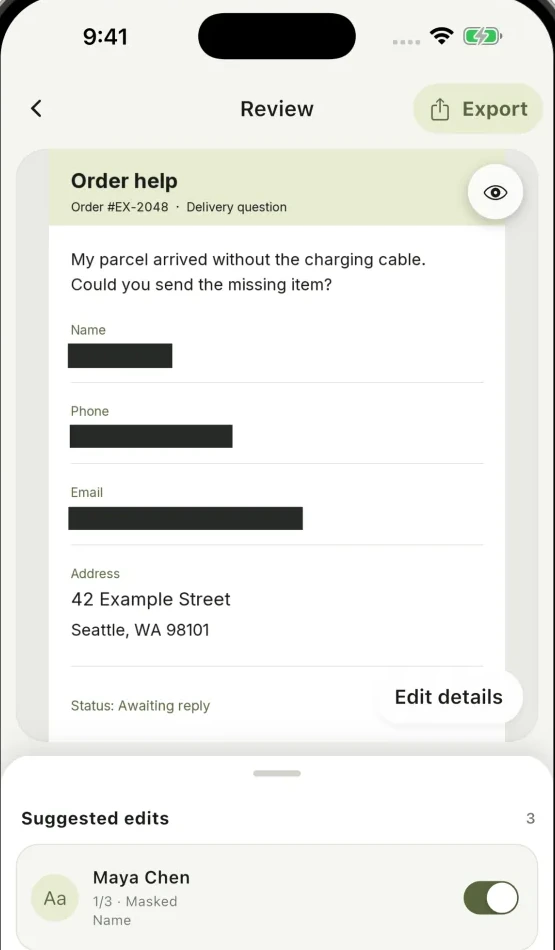
For a public post about the missing item, those address lines do not help explain the problem. Open Edit details and use Add mask to cover them. Also decide whether the order reference belongs in that post.
For a message to the verified seller, the order reference may be useful. The destination changes what you choose to keep. The scan cannot make that decision from the pixels alone.
Read the image in a fixed order
| Part of the image | What to do |
|---|---|
| Top edge and headers | Check: Notifications, account names, conversation titles Cover unrelated names or private message previews |
| Main content | Check: Addresses, emails, IDs, financial details, credentials Cover the complete private value |
| Repeated or quoted content | Check: The same information in a reply, log or second field Mask every visible copy you intend to hide |
| Images and codes | Check: Faces, avatars, QR codes and barcodes Review suggestions; add a mask if needed |
| Bottom edge | Check: Footers, file paths, tabs and another message Keep only what the recipient needs |
Going from top to bottom is easier than jumping between colored highlights. First look at the image at normal size, then zoom in on private fields. A tiny fragment of a wrapped line is easy to overlook when the whole screenshot is reduced.
A result with no findings can still need editing. Unusual text, small lettering, a face or an encoded value may be missed or require your judgment.
Covering a face is only one part of the image
Review any face suggestions when the photo contains people you do not intend to show. Use a manual mask when there is no suitable suggestion or when the suggested region is incomplete.
An avatar, name badge, recognizable room or caption can still identify someone after their face is covered. If your purpose is to avoid identifying a person, read those surroundings too.
Keep the information that makes the screenshot understandable. A conversation about a broken device can usually retain the device and error message while leaving unrelated people or account details covered.
Treat QR codes as information you have not read yet
A QR code or barcode can be easy to ignore because it does not look like text. If the recipient has no reason to use it, consider covering it along with any nearby printed reference number.
Hiding the code while leaving the same reference in plain text may not accomplish your purpose. Conversely, hiding only the printed text leaves the code visible. Look at both representations.
Cloakshot can suggest code regions, and its editor lets you add a mask. Add a mask yourself when a code has no suggestion.
Inspect the exported image once more
Return to Review, choose any relevant metadata-removal options and tap Export. The main app checks selected edits and scans the resulting PNG again. If it reports a remaining detail, return to the editor and decide how to handle it.
Open the saved PNG and read it from top to bottom. In the order case, the missing-cable sentence should remain readable, while the contact and address details chosen for hiding should be covered completely.
Choose that exported copy when attaching the image. The original remains unchanged. Scanning and editing are free; export requires an active eligible trial or the one-time Pro Lifetime purchase.